Parashift/Data extraction
Capability · Extraction

Extract data from documents, without a template per layout.

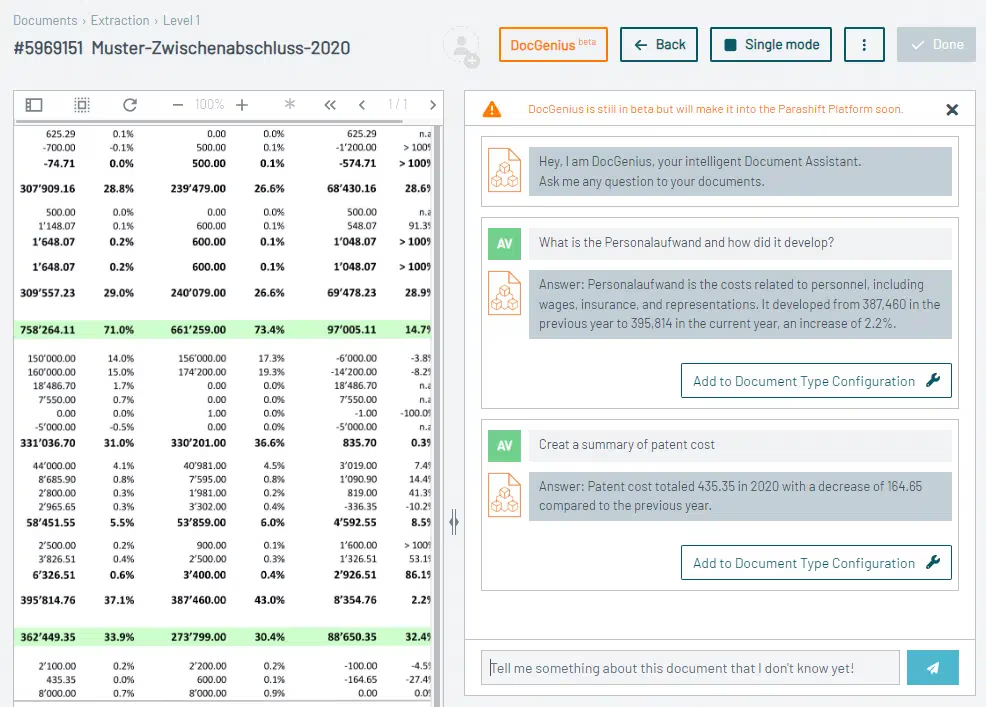
Invoices, contracts, forms and identity documents hold the values your systems need. Parashift reads them by content, field by field, with a confidence value per value instead of unstructured full text.

Zero-shot, no training phaseLine items as a tableC5 · SOC 2 · ISO 27001
Supplier invoice · page 1/3Extracted
SupplierSample Trading Ltd
Invoice number2026-04417
Net amountCHF 12 840.00
Confidence99%
12 header fields and 24 line items detected
The process today

Retyping is the most expensive step in the process.

In most organisations a person reads the document and transfers the values into the system. That is slow, error-prone and only scales by adding headcount.

Template-based extraction just moves the effort: instead of retyping, someone maintains zones and rules. Every new sender, every new layout costs time again before a single value comes out.

What it covers

What the extraction does.

Fields per document type

You define which fields a document type should return. The recognition finds them in the document, wherever they sit.

Line items as a table

Article, quantity, unit price and amount come back as structured rows, not as a block of text.

Confidence per field

Every value carries a confidence value. You decide at which threshold processing continues automatically.

Validation against master data

Extracted values can be checked against supplier, customer or article master data before they reach the target system.

Handwriting, fax, poor scans

Skewed pages, fax quality and handwritten additions are normal operation, not an exception.

Zero-shot on new layouts

A layout that has never been seen is read on the first run. There is no training phase per sender.

How it works

From document to structured record.

01 · INTAKE

Any source

API, mailbox, scanner or watched folder.

02 · CLASSIFICATION

Type per page

First it is established what the document is, then which fields are sought.

03 · EXTRACTION

Fields and line items

Header fields and line items are read out and given confidence values.

04 · HANDOVER

Target system

Structured data goes by API into the ERP, DMS or workflow, uncertain values go to review.

Comparison

Template-based extraction and Parashift.

Template-basedParashift
New senderCreate zones and rulesRead without setup
Layout change at an existing supplierTemplate breaks, outage until correctedKeeps running
Line itemsOften only header fields are reliableLine items as structured rows
Uncertain valuesSilent error in the target systemConfidence per field, review above threshold
Handwriting and faxFrequent failurePart of normal operation
Effort over timeGrows with every senderStays with the number of document types
Impact

What changes in data capture.

70%

shorter handling time on average

Reference: Raiffeisen
400+

preconfigured document types with fields

Parashift platform
0

templates per sender to maintain

Parashift architecture

Extraction is the second step.

First the document type is recognised, then the matching fields are read. Together they make up the digital mailroom.

See the digital mailroom
Frequently asked

Data extraction, answered briefly.

What does zero-shot mean in data extraction?
The recognition needs no sample and no template for a layout it has never seen. A new invoice form is read on the first run, not after a training phase.
Which fields can I have extracted?
You define the fields per document type. Typical ones are header fields such as supplier, number, date and amount, plus line items with article, quantity and price. Your own fields are added without programming.
Are tables and line items recognised correctly?
Yes. Line items are handed over as structured rows, not as a block of text, so checking rules can calculate on them directly.
How do I know whether a value is correct?
Every field comes with a confidence value. Below your threshold the value goes to the review interface instead of running unchecked into the target system.
Does this work with poor scan quality and handwriting?
Yes. Fax quality, skewed pages and handwritten additions are the norm in real mailrooms and are part of the processing.
How does the data reach our ERP or DMS?
Through a documented REST API or webhooks. What is handed over are structured, validated fields with their confidence value, not image files.

Extract data from documents automatically.

Book a no-obligation briefing: we will show the extraction on your own documents.

Reply the same working day · no sales pressure